How do I Check my NYSC Portal Call-up Letter?
If you are asking how do I check my NYSC portal call-up letter, you are not alone. Every year, thousands of Nigerian graduates search for the correct and safest way to check their call-up letter on the NYSC portal, especially during peak deployment periods when the site can be slow or confusing.
To check your NYSC portal call-up letter, you must use the official NYSC portal and follow the right steps at the right time. Many people miss their call-up letter simply because they check too early, log in incorrectly, or use unofficial links shared on social media. This guide is written to help you avoid those mistakes.
In this updated 2026 guide, you will learn when the call-up letter becomes available, how the NYSC portal works, what you need before checking, and how to confirm that your call-up letter is ready.
Understanding the NYSC Call-Up Letter and When It Becomes Available
Before you try to check your NYSC portal call-up letter, it is important to understand what the call-up letter is, why it matters, and when it is usually released on the NYSC portal.
What Is the NYSC Call-Up Letter?
The NYSC call-up letter is an official document issued by the National Youth Service Corps (NYSC) to prospective corps members. It contains important deployment information, including:
- Your state of deployment
- Date to report to the orientation camp
- Orientation camp address
- Instructions for camp registration
- Documents you must take to camp
Without this letter, you cannot participate in NYSC orientation camp, even if you successfully registered on the NYSC portal.
This is why checking your call-up letter correctly is one of the most important steps in the NYSC process.
Who Is Eligible to Check the NYSC Call-Up Letter?
You can only check your call-up letter if:
- You have successfully completed NYSC online registration
- Your school has uploaded and verified your senate list
- NYSC has approved your deployment
- You are not issued an exemption letter
If you fall under the exemption category, you will not see a call-up letter. Instead, you will later check and print an NYSC exemption letter from your dashboard.
When Is the NYSC Call-Up Letter Released?
This is where many people get confused.
NYSC does not release call-up letters immediately after registration. The call-up letter is usually released:
- 7–14 days before orientation camp opens
- Sometimes in batches, not all at once
- Often announced via official NYSC channels
During peak periods, you may log in and see a message like:
“You are not yet deployed.”
This does not mean there is a problem. It simply means NYSC has not released your call-up letter yet.
How to Know When Your Call-Up Letter Is Ready
To know when to check your NYSC portal call-up letter, look out for:
- NYSC announcements on the official portal
👉 https://portal.nysc.org.ng - Updates from your school or student affairs office
- Information from trusted NYSC guides (not random WhatsApp broadcasts)
Once NYSC announces that call-up letters are available, you can proceed to check and print yours.
Why Some People Cannot See Their Call-Up Letter
Many Nigerian graduates panic when they cannot see their call-up letter. Common reasons include:
- Checking too early
- Incomplete NYSC registration
- Errors in personal details (name, date of birth)
- School has not finalized uploads
- Network or browser issues
- NYSC portal traffic overload
At this stage, do not pay anyone claiming they can “help you release” your call-up letter for ₦5,000 or ₦10,000. That is a common scam.
Difference Between Call-Up Letter and Posting Letter
Another common confusion when trying to check my NYSC portal call-up letter is mixing it up with the posting letter.
- Call-Up Letter: Printed before camp and used to enter orientation camp
- Posting Letter: Printed after camp, showing your Place of Primary Assignment (PPA)
If you are about to go to camp, you are looking for the call-up letter, not the posting letter.
What You Need Before Checking Your Call-Up Letter
Before moving to the actual steps, make sure you have:
- Your registered email address
- Your NYSC password
- A phone or computer with stable internet
- A browser like Chrome or Firefox
- A PDF reader for printing
Using a cyber café is allowed, but always log out after checking your NYSC dashboard.
Official Portal to Check NYSC Call-Up Letter
To safely check your NYSC portal call-up letter, always use the official NYSC portal:
Do not use shortened links or websites that ask for payment before login.
Important Safety Reminder
NYSC does not charge any fee to check or print your call-up letter. The only official payment during registration is for optional services like call-up letter relocation (when applicable), paid directly on the NYSC portal.
If any site asks you to pay before checking your call-up letter, leave immediately.
Step-by-Step Guide to Check and Print Your NYSC Portal Call-Up Letter (2026)
Now that you understand what the call-up letter is and when it becomes available, this section answers the most important practical question: how do I check my NYSC portal call-up letter step by step without making mistakes.
This section is written for 2026 and reflects how the NYSC portal currently works for Nigerian graduates, including common issues people face during heavy traffic periods.
Step 1: Visit the Official NYSC Portal (Very Important)
To check my NYSC portal call-up letter safely, always start from the official NYSC portal:
Do not use links sent by strangers on WhatsApp, Telegram, or Facebook groups. Fake sites often look similar and may ask for payments or steal login details.
Once the page loads, you should see the NYSC portal homepage with login options.
Step 2: Log In to Your NYSC Dashboard
On the NYSC portal homepage:
- Click “Login Here”
- Enter the email address you used during NYSC registration
- Enter your password
- Click “Login”
If your details are correct, you will be taken to your NYSC dashboard.
📌 Tip:
If the portal is slow or not loading, wait a few minutes and refresh. During peak periods, many Nigerians are logging in at the same time.
Step 3: Locate the Call-Up Letter Section on Your Dashboard
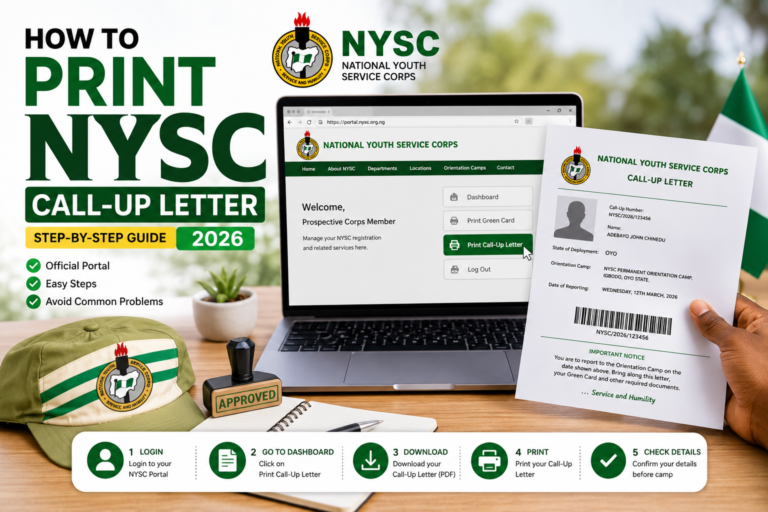
Once logged in, look through your dashboard menu. You should see an option similar to:
- “Print Call-Up Letter”
- or “Call-Up Letter”
If your call-up letter has been released, this option will be active and clickable.
If it is not yet released, you may see messages like:
- “You have not been deployed”
- “Call-up letter not yet available”
This means you need to check again later.
Step 4: Click “Print Call-Up Letter”
When the call-up letter is available:
- Click “Print Call-Up Letter”
- A PDF file will open in a new tab
- The document will display your:
- Full name
- State of deployment
- Orientation camp address
- Reporting date
- NYSC call-up number
At this point, you have successfully completed the main part of check my NYSC portal call-up letter.
Step 5: Save and Print Your Call-Up Letter Correctly
This step is very important and often overlooked.
How to Save It
- Download the PDF file to your phone or computer
- Save multiple copies (phone, email, USB, Google Drive)
How to Print It
- Print in black and white or colour
- Use A4 paper
- Make at least 2–3 copies
You will present this document at the orientation camp gate.
Step 6: What If the Call-Up Letter Does Not Open?
Sometimes, users click “Print Call-Up Letter” and nothing happens. Common fixes include:
- Refresh the page and try again
- Use another browser (Chrome works best)
- Disable ad blockers
- Clear browser cache
- Try at off-peak hours (early morning or late night)
If you are using a cyber café, ensure pop-ups are not blocked.
Step 7: Checking Call-Up Letter Using a Phone vs Computer
You can check my NYSC portal call-up letter using either:
- A smartphone
- A laptop or desktop computer
However, printing is easier on a computer. If you use a phone:
- Download the PDF
- Send it to a computer or cyber café for printing
Step 8: Common Errors Nigerians Face When Checking Call-Up Letters
Here are frequent problems and what they mean:
“You Have Not Been Deployed”
- NYSC has not released your call-up letter yet
- Check again later
“Invalid Login Details”
- Wrong email or password
- Use the password reset option
Blank Page or White Screen
- Network issue
- Browser problem
- Portal traffic overload
Asked to Pay Before Printing
- This is not normal
- NYSC does not charge for call-up letter printing
Step 9: What to Do If You Forget Your NYSC Password
If you cannot log in:
- Click “Forgot Password” on the login page
- Enter your registered email
- Follow the reset link sent to your email
- Create a new password
- Log in again and continue to check your call-up letter
Step 10: Important Warnings and Safety Tips
When trying to check my NYSC portal call-up letter, remember:
- Do not share your login details with anyone
- Do not pay agents claiming they can “fix” deployment
- Do not rely on screenshots from friends
- Always confirm information from the official portal
If the portal is slow, patience is safer than shortcuts.
Internal Tip for NYSC Portal Guide Readers
If you are also struggling with:
- NYSC portal login problems
- NYSC dashboard errors
- NYSC exemption letter confusion
You should check other detailed guides on nyscportalguide.com that explain each issue separately.
Troubleshooting Problems, FAQs, and Final Tips for Checking Your NYSC Portal Call-Up Letter (2026)
By this stage, most readers who want to check NYSC portal call-up letter have either successfully printed it or are facing one of the common problems Nigerians experience every year. This final section focuses on real-life issues, clear fixes, frequently asked questions, and practical advice to help you move forward without panic or unnecessary expenses.
What to Do If You Still Cannot See Your Call-Up Letter
If you have followed the steps correctly and still cannot see your call-up letter, do not panic. In many cases, the issue is temporary or administrative.
Below are the most common situations and what they mean.
1. “You Have Not Been Deployed” Message
This is the most common message users see when trying to check my NYSC portal call-up letter.
What it means:
- NYSC has not released your batch yet
- Deployment is still ongoing
- Your letter may be released in the next batch
What to do:
- Check again daily
- Follow official NYSC announcements
- Avoid agents promising quick deployment
2. Your Friends Have Printed, But You Haven’t
This situation causes unnecessary fear.
Important to know:
- NYSC releases call-up letters in phases
- Not everyone sees their letter at the same time
- Your school or course may be processed later
This does not mean you are disqualified.
3. Wrong Name, Date of Birth, or Institution on Call-Up Letter
If you successfully check my NYSC portal call-up letter but notice errors:
Common issues include:
- Misspelled name
- Wrong date of birth
- Incorrect institution
What to do:
- Log in to your NYSC dashboard
- Use the “Correction of Data” option (if available)
- Follow NYSC instructions strictly
Do not attempt unofficial changes or pay anyone to “edit” your letter.
4. Call-Up Letter Not Opening or Downloading
If clicking “Print Call-Up Letter” shows:
- Blank screen
- Error message
- Page not loading
Try the following:
- Change browser (Chrome or Firefox recommended)
- Clear cache
- Disable VPN
- Try again late at night or early morning
- Use a stronger internet connection
NYSC portal traffic is usually heavy during release days.
NYSC Call-Up Letter and Relocation Questions
Many Nigerians ask about relocation immediately after checking their call-up letter.
Can I Change My State of Deployment?
NYSC allows relocation only under specific conditions, such as:
- Medical reasons
- Marital reasons
- Security-related concerns
Relocation is handled inside camp, not before reporting.
NYSC Call-Up Letter vs Exemption Letter
If you are expecting a call-up letter but see nothing, confirm whether you are exempted.
You will receive an exemption letter instead of a call-up letter if:
- You are above the age limit
- You have served in certain government roles
- You studied outside Nigeria (in some cases)
Exemption letters are also printed from the NYSC dashboard, but under a different option.
Official and Safe Links You Should Use
To avoid scams, always use official channels:
- NYSC Portal:
https://portal.nysc.org.ng - NYSC Main Website:
https://www.nysc.gov.ng
Avoid links asking for payment before login or requesting sensitive information.
Frequently Asked Questions (FAQ)
1. How do I check my NYSC portal call-up letter in 2026?
Log in to the official NYSC portal using your registered email and password. Once released, click “Print Call-Up Letter” on your dashboard and download the PDF.
2. Can I check my NYSC call-up letter on my phone?
Yes. You can log in and download the letter on a smartphone. However, printing is easier using a computer or cyber café.
3. Is there a fee to check or print my NYSC call-up letter?
No. NYSC does not charge any fee to check or print call-up letters. Any payment request is a red flag.
4. What if I forgot my NYSC portal password?
Use the “Forgot Password” option on the login page and reset it using your registered email address.
5. Why is my call-up letter not showing while others have printed theirs?
NYSC releases call-up letters in batches. Yours may be scheduled for a later release.
6. Can someone else check my call-up letter for me?
Yes, but only if you trust them completely. Never share your login details with strangers or agents.
7. What documents should I take to camp along with my call-up letter?
Common documents include:
- Printed call-up letter
- Green card
- School ID or statement of result
- Passport photographs
Always confirm the current NYSC checklist before camp.
Final Warnings and Best Practices
When trying to check your NYSC portal call-up letter, remember:
- NYSC does not operate through WhatsApp agents
- NYSC does not ask for unofficial payments
- Delays are common and normal
- Official updates matter more than rumours
If something feels suspicious, step back and verify.
Conclusion: Checking Your NYSC Portal Call-Up Letter the Right Way
If you have followed this guide carefully, you now understand exactly how to check NYSC portal call-up letter, when it becomes available, how to print it safely, and what to do if problems arise.
The key points to remember are:
- Always use the official NYSC portal
- Be patient during release periods
- Avoid shortcuts and agents
- Verify information from trusted sources
- Keep multiple copies of your call-up letter
NYSC is a major milestone for many Nigerian graduates. With the right information and calm approach, checking your call-up letter does not have to be stressful.
For more step-by-step guides, troubleshooting tips, and NYSC updates, continue exploring nyscportalguide.com, an independent informational resource designed to help you navigate the process confidently, while always confirming final details from the official National Youth Service Corps (NYSC) channels.